How to Use WhatsApp Automation to
Scale Your Interior Business
Published On: 20 February 2026
As a business owner in the interior design industry, your day probably starts long before you reach the office. You’re likely juggling site visits, supplier delays, and the constant ping of client inquiries. We’ve all been there, you’re in the middle of a critical design discussion, and your phone vibrates with a new lead from Instagram or Meta. You know that if you don’t reply within minutes, that lead might go to the competitor who answers first. But you also can’t just stop your creative work every time the phone rings.
This is where the Dzylo WhatsApp API steps in. It’s not just a messaging tool, it’s a silent partner that manages your communication so you can get back to the work that actually grows your revenue.
The Real Cost of Manual Communication
Why is automation no longer just an option but a necessity? Consider the math of a typical day. If you spend minutes manually typing a “Welcome” message for 5 - 6 leads and 10 minutes following up with three different leads, you’ve already lost a lot of productive time. Beyond time, there’s the mental load. Keeping track of who needs a site visit reminder, who hasn’t received their quotation, and who missed their demo is exhausting. Manual communication is prone to human error, you forget a name, you send the wrong link, or worse, a message slips through the cracks entirely. Business automation via the Dzylo WhatsApp API ensures that your brand remains 24/7 responsive, professional, and consistent, regardless of how busy you are on-site. It bridges the gap between a lead and a loyal client by providing instant gratification through immediate, personalized engagement.
How Dzylo Puts Your Business on Automations
Dzylo has built its WhatsApp integration specifically for the workflows of interior designers and contractors. It doesn’t just send messages, it understands the stages of your project.
Here is how Dzylo transforms your operation:
- Integrated Setup & Official Verification: You don’t need to be a tech genius to start. You integrate your official Business WhatsApp number directly through Dzylo’s settings.
- Template Intelligence: Dzylo offers pre approved templates that you can use to automate your workflows, you can also create custom templates like a Welcome Message or Payment Received. This means the system automatically pulls the client’s name and project details, so every message feels like it was handwritten by you.
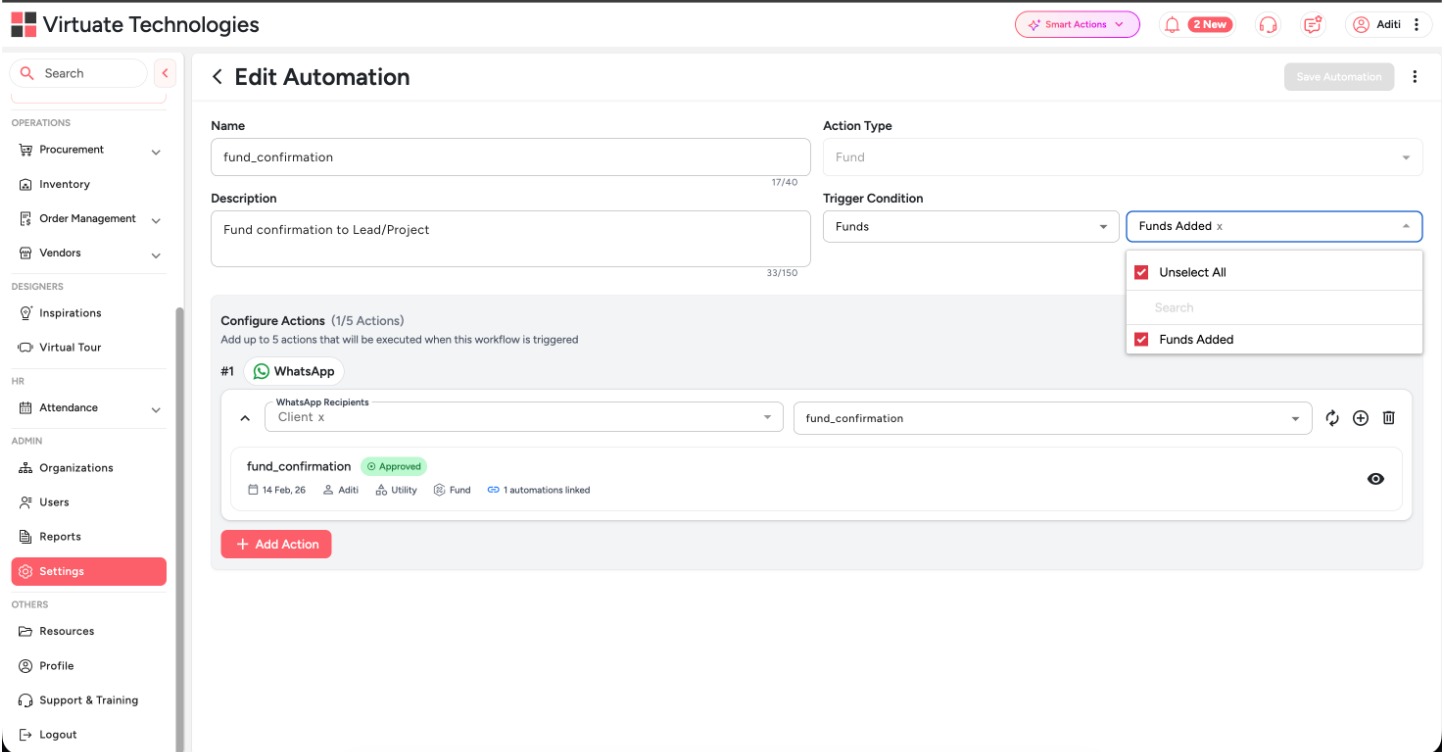
Use Dzylo’s API automations to your advantage
Dzylo’s automation isn’t generic, it is built around the specific flow of an interior design project. To make it work, you simply choose your template type and link it to a business trigger.
Set Your High Impact Triggers
Once your template is ready and approved by Meta, you link it to one of the core business triggers in Dzylo
Lead Triggers: The second a lead is created in your system (from Meta ads, website forms, referrals etc), Dzylo fires off your welcome message. No more manual Hi, thank you for reaching out texts at midnight.
Simultaneously, you can configure the same trigger to alert your Sales team the moment a lead arrives. This ensures your internal team can jump on the opportunity instantly, maintaining a zero-delay response cycle
Project Triggers: As your project moves through stages from Design to Execution the system automatically updates the client. This transparency builds massive trust without you having to pick up the phone (only if you want the client to see it).
At the same time, the Assigned Team Member receives a direct alert with the task details. This dual automation keeps the client reassured that work is happening while keeping your field staff or designers accountable and on schedule.
Task Triggers: Eliminate the I didn’t know excuse by automating task assignments and completions. The moment a task is created or updated, Dzylo sends a real-time notification to the person in charge to take on the responsibility.
Fund Triggers: Chasing and acknowledging payments is the most stressful part of the job. With the Fund Received trigger, the moment you log a payment in Dzylo, an instant Payment Received acknowledgment is sent to the client.
You can also configure this trigger to notify your Accounts Head or Procurement Team. The second the client gets their receipt, your team knows exactly when funds are cleared to release orders or pay suppliers.
Expense Triggers: Keep your internal team and suppliers in the loop. Set triggers for when an Expense is recorded or approved to ensure everyone stays on budget and on schedule.
Link this trigger to your Site Supervisor or Admin. While the system tracks the budget, your team gets instant confirmation that their expenses are approved, allowing them to proceed with on-site work without waiting for manual emails.
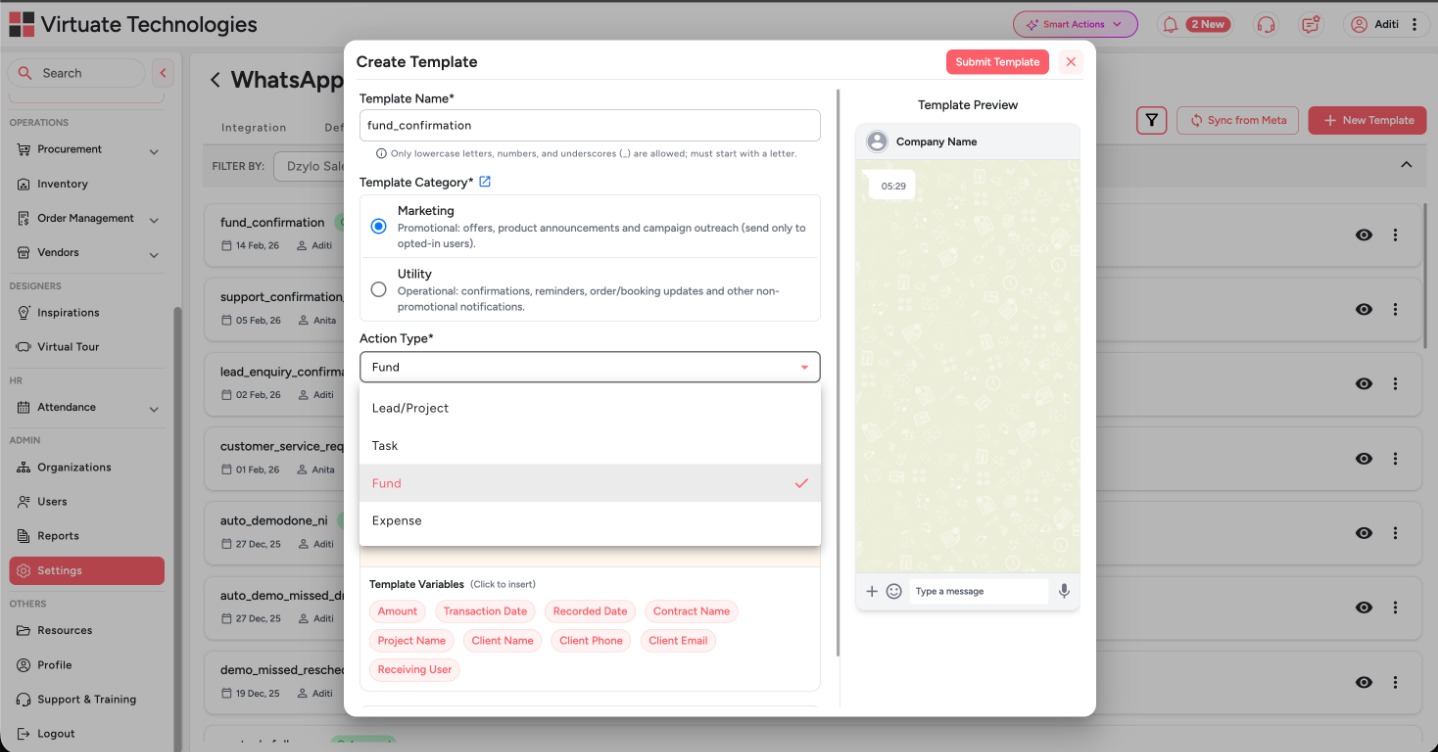
From Chaos to Clarity with Dzylo
The Before Scenario: Imagine your current workflow. A lead comes in at 9:00 PM. You’re at dinner, so you don’t see it. You reply the next morning at 11:00 AM, but by then, the client has already messaged two other designers. Throughout the day, your site supervisor calls you because they forgot the details of their next task. You’re stuck in a loop of re-sending information and checking in, leaving you zero time for actual design or strategy. You feel like the business is running you, rather than the other way around.
The After Scenario with Dzylo: Now, imagine that same lead coming in at 9:00 PM. While you’re still at dinner, the Dzylo WhatsApp API instantly sends a professional welcome message: Hi [Client Name], thank you for reaching out to [Your Firm]! We’re excited to help you build your dream home. Here is a link to track your project journey with us… The next morning, you open your Dzylo dashboard to see that the lead is already qualified and waiting for a call. When you move a project from Design to Execution, your client gets a WhatsApp update automatically. Your team receives their daily tasks via WhatsApp, and you finally have the headspace to focus on high-level business growth. You aren’t just an interior designer anymore, you’re a business owner with a system that never sleeps.
Stop being the bottleneck in your own growth and start building a system that works as hard as you do.