Dzylo vs ClickUp: Which Project Management
Software is Better for Interior Designers?
Published On: 3 August 2026
Interior design projects are far more complex than regular task management.
Managing client meetings, quotations, procurement, vendor payments, drawings, approvals, inventories, and project execution requires much more than assigning tasks on a board.
Many interior businesses start with ClickUp because it’s one of the most popular project management tools available today. However, as projects scale, they often find themselves juggling multiple spreadsheets, WhatsApp chats, Google Drive folders, and accounting software alongside ClickUp.
That’s where Dzylo comes in.
Unlike ClickUp, Dzylo is built specifically for interior designers, architects, and turnkey execution businesses.
What is ClickUp Best At?
ClickUp is an excellent all-purpose project management platform.
It offers:
- Task Management
- Checklists
- Kanban Boards
- Gantt Charts
- Docs
- Dashboards
- Time Tracking
- Automations
What Makes Dzylo Different?
Dzylo isn’t just another project management software. It’s an operating system for interior businesses. Instead of combining five or six different tools, Dzylo brings everything into one platform.
With Dzylo, you can manage:
- Leads
- Client Meetings
- Quotations
- BOQs
- Procurement
- Inventory
- Vendor Payments
- Projects
- Tasks
- Drawing Reviews
- Document Approvals
- Team Collaboration
- Site Execution
- Client Billing
Everything remains connected throughout the project lifecycle.
Quotation Management
Creating quotations inside ClickUp usually means using Docs, custom fields, or external software.
There’s no dedicated quotation workflow.
Dzylo provides:
- Interior-specific quotation templates
- BOQ generation
- Multiple revisions
- Approval tracking
- Client sharing
- Cost calculations
This significantly reduces manual work.
Procurement & Vendor Management
Procurement is one of the biggest challenges in interior execution.ClickUp can assign procurement tasks, but it doesn’t manage the procurement process itself.
Dzylo allows businesses to:
- Raise purchase requests
- Create purchase orders
- Track vendor deliveries
- Manage vendor payments
- Monitor procurement status
- Track pending materials
Everything is visible in one dashboard.
Inventory Tracking
Material movement is difficult to monitor using generic project management software.
Dzylo enables teams to:
- Track stock
- Record inward and outward inventory
- Monitor warehouse availability
- Track material usage project-wise
- Prevent duplicate purchases
ClickUp doesn’t include inventory management without external tools.
Document Review & Drawing Approval
Interior projects involve multiple revisions of:
- Electrical layouts
- Plumbing drawings
- Furniture layouts
- False ceiling drawings
- 3D renders
ClickUp allows file uploads and comments, but version control and approval workflows often require manual coordination.
Dzylo offers a structured document review system where teams can:
- Pin comments directly on drawings
- Track unresolved comments
- Manage revisions
- Maintain version history
- Record approvals
This reduces missed feedback and version confusion.
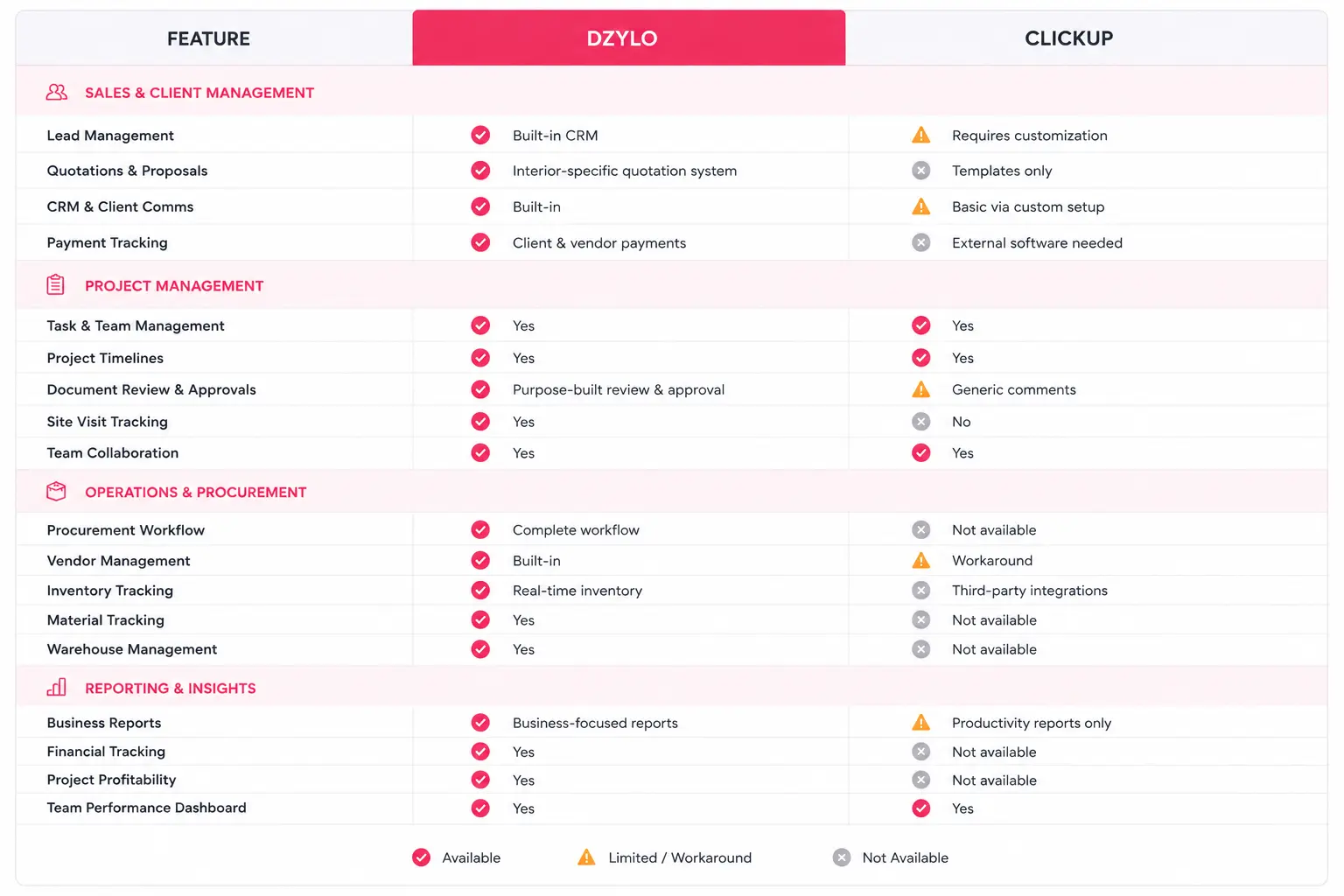
ClickUp is one of the best project management platforms for general business use. It excels at organizing tasks, improving team collaboration, and managing workflows across different industries.
However, interior design businesses often need much more than task management.
Dzylo is purpose-built to address the unique operational challenges of interior projects—from lead management and quotations to procurement, inventory, drawing approvals, and site execution.
If your goal is simply to manage tasks, ClickUp is an excellent choice. But if you’re looking for software designed specifically to run an interior business end-to-end, Dzylo offers a more specialized solution with workflows tailored to the industry.