The Ultimate Guide to Interior Design
Procurement Management in 2026
Published On: 2 April 2026
In the interior design industry, a common saying is: Design is 10% inspiration and 90% procurement. While the 3D renders get the likes on Instagram, it is the interior design procurement management the grueling process of sourcing, vetting, ordering and tracking thousands of items that actually determines whether your firm makes a profit or a loss. In 2026, as material costs fluctuate and client expectations for instant updates rise, managing procurement via WhatsApp and Excel is no longer just old fashioned it’s a financial risk
Poor interior design procurement management is the 1 reason projects go over budget and past their deadlines. In 2026, relying on memory or WhatsApp chats to track thousands of items is no longer a viable business strategy.
The Three Pillars of Professional Procurement
To run a profitable firm, your procurement process must solve three specific problems:
- Budget Slippage: How many times have small material price hikes eaten your entire profit margin? Without a real-time procurement tracker, you don’t realize you’re over budget until it’s too late.
- Order Chaos: Managing 50+ Purchase Orders (POs) across 20 different categories (Electrical, Plumbing, Furniture) is impossible without a centralized system.
- Site Stagnation: If the flooring arrives but the adhesive is missing, your labor sits idle. Procurement is about timing as much as it is about buying.
How Dzylo Automates Your Procurement Workflow
Dzylo’s procurement management module for interior businesses is designed to eliminate manual follow-ups and streamline your daily workflow.
How the Ecosystem Fuels Your Procurement Engine.
Think of procurement as the engine of your project execution—and the supplier ecosystem as the fuel that keeps it running smoothly. In Dzylo, these two elements work together seamlessly to create a structured, transparent, and highly efficient procurement process for interior businesses.
Let’s walk through how this ecosystem powers your procurement workflow:
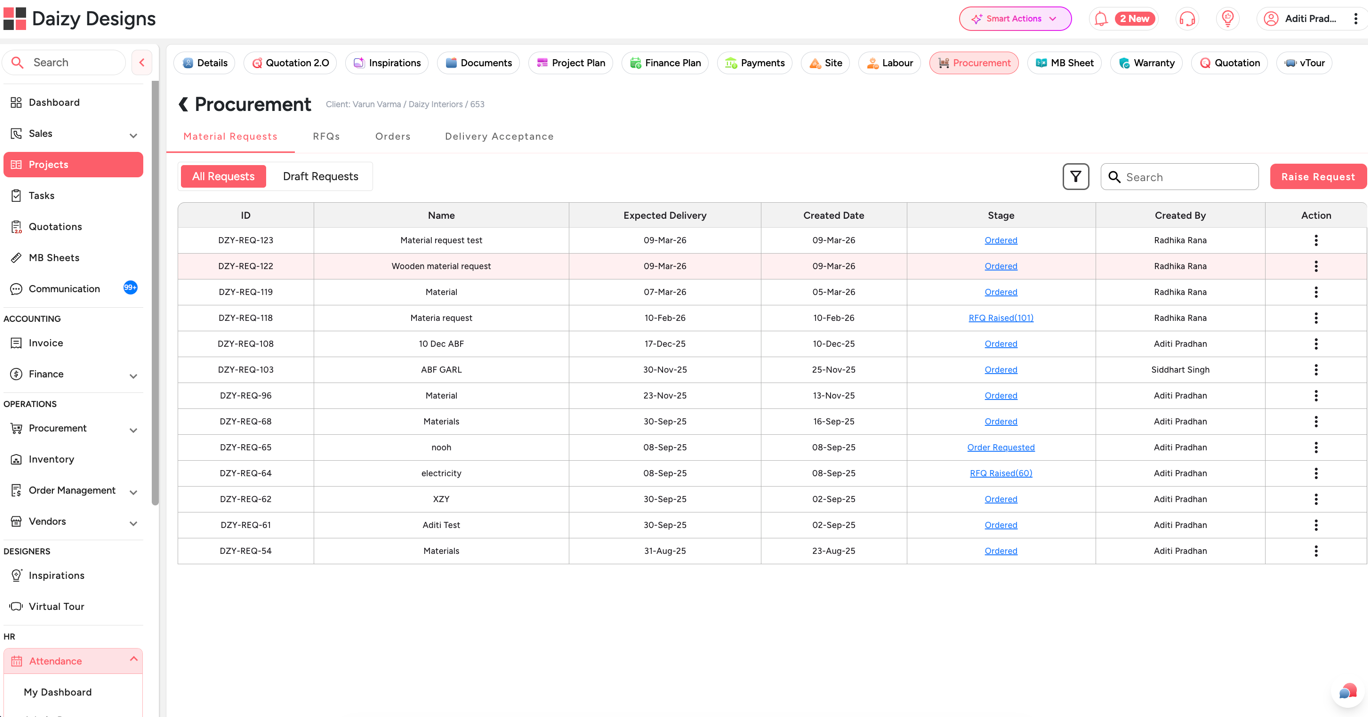
Material Request from Site:
The process begins right at the site. A site supervisor can easily raise a material request based on on-ground requirements. This ensures that procurement is always aligned with actual site needs, avoiding delays and miscommunication.
Approval Workflow
Once the request is created, it moves through an approval process. This step ensures control over budgets and prevents unauthorized purchases. Only approved requests move forward in the procurement cycle.
RFQ Sent to Multiple Suppliers
After approval, the request can be converted into a quotation (RFQ) and shared with multiple suppliers simultaneously. This eliminates the need to manually contact each supplier and explain requirements repeatedly.
Standardized Sourcing
With Dzylo’s standardized templates, all suppliers receive the same structured information. This ensures clarity, reduces errors, and creates a fair and consistent sourcing process.
Supplier Comparison Made Easy
Once suppliers submit their quotations, you can compare prices and details side-by-side within the system. This helps you make informed decisions and choose the best supplier based on pricing, quality, or other factors.
Purchase Order Creation
After finalizing the supplier, you can instantly generate a Purchase Order (PO). This PO is directly linked to the approved quotation, ensuring complete accuracy and eliminating mismatches.
Supplier Acceptance & Confirmation
The selected supplier receives a notification to accept the purchase order. Once accepted, the PO moves to the “Acceptance” stage, giving you clear visibility on order confirmation.
Material Receipt at Site/Warehouse
As materials are delivered, the site or warehouse team can update received quantities directly in the system. This keeps procurement and execution perfectly in sync.
Automatic Inventory Updates
Once the receipt is recorded, Dzylo automatically generates a “Delivery Stock In” entry in the inventory. This ensures that the inventory team has real-time data without manual duplication of work.
Why This Matters.
This entire ecosystem removes manual coordination, reduces errors, and ensures every stepfrom request to inventory is connected and traceable. With Dzylo, procurement is no longer a fragmented process but a fully integrated workflow that saves time, improves accuracy, and enhances control.
This is how Dzylo transforms procurement from a reactive task into a streamlined, intelligent system powered by its ecosystem.
Frequently Asked Questions (FAQs)
1. Can I onboard all my suppliers easily with Dzylo?
Yes. Dzylo makes supplier onboarding extremely simple and structured. You can create your own customized supplier onboarding form, define mandatory KYC documents, and even generate a QR code to share on social media or at your project sites. Your supplier manager can manually add suppliers as well. Since Dzylo is specialized procurement software for interior companies, it also provides access to a pre-verified supplier directory. You can browse supplier catalogs, shortlist suppliers, and add them directly to your preferred supplier list — giving you a strong, compliant, and scalable supplier ecosystem.
2. Can I send RFQs to multiple suppliers in one click and compare their rates?
Absolutely. With Dzylo, you can create an RFQ and send it to multiple suppliers instantly. Suppliers receive a WhatsApp link to view and submit their quotations. Once they upload their rates, Dzylo generates a clean, item-wise comparison table. This helps you negotiate better pricing, eliminates middlemen, and brings full transparency to your procurement workflow. Once you finalize a supplier, you can convert the RFQ into an interior purchase order in a single click. This is one of the reasons Dzylo is preferred as the leading procurement software for interior businesses.
3. Can I set up approval workflows for Purchase Orders (PO)?
Yes. Dzylo allows you to enforce PO approvals to ensure cost control and prevent overpriced sourcing. You can restrict PO creation and approval permissions to selected Purchase Managers. Before approving, they can review supplier comparisons, prices, and terms — ensuring every interior purchase order goes through a transparent and accountable approval process.
4. How does Dzylo’s inventory management work for interior designers?
Traditional systems assume materials sit in a central warehouse — but inventory for interior projects lives across multiple job sites. That’s where most tools fail. Dzylo solves this with project-level inventory management, allowing interior companies to track materials at each site and even move stock seamlessly from one project to another.
5. How do material deliveries get added to my inventory?
Accepted deliveries automatically move into your Inventory workflow. The Inventory Manager can review, approve, and ingest them into project-level inventory with a single click. This keeps interior material management seamless—every PO delivery directly updates your stock without any manual duplication.